School Classroom 3D Icon Pack
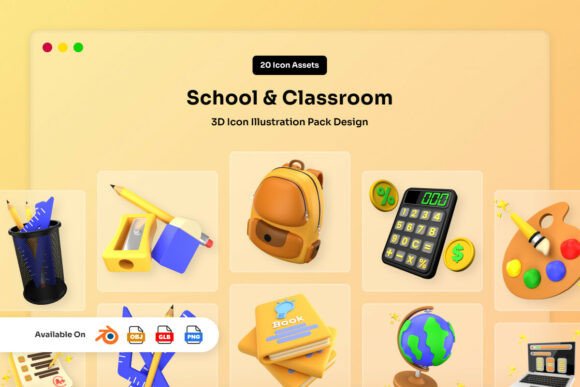
In the crowded landscape of digital design, standing out often comes down to the quality of your visuals. The School Classroom 3D Icon Pack offers a distinct solution for designers and educators seeking assets that bridge the gap between playful engagement and professional polish. By combining playful realism with soft matte textures, this collection creates friendly, approachable visuals that resonate immediately with audiences of all ages. Unlike flat illustrations that can feel sterile or hyper-realistic renders that may overwhelm a layout, these icons utilize smooth rounded forms and balanced lighting to evoke warmth. This specific aesthetic is not just a stylistic choice; it is a strategic tool for education-related content where trust and accessibility are paramount.
The Aesthetic of Soft Realism in Education
What makes this pack particularly interesting is its commitment to a "soft" visual language. In educational contexts, harsh edges and aggressive shadows can sometimes create a sense of distance or intimidation. The School Classroom 3D Icon Pack avoids this by employing a matte finish that feels tactile and gentle. This texture mimics high-quality classroom materials like felt boards, wooden blocks, and laminated paper, grounding the digital assets in a physical reality that users recognize and understand.
For web designers and app developers, this consistency is crucial. When you integrate these icons into a user interface, the balanced lighting ensures they remain legible against various background colors without requiring excessive contrast adjustments. The rounded forms guide the eye naturally, making complex academic concepts feel less daunting. Whether you are illustrating a math problem, a reading exercise, or a science experiment, the inherent friendliness of the design lowers the cognitive load for the viewer, allowing them to focus on the content rather than deciphering the graphic.
Practical Applications Across Digital Platforms
The versatility of this asset pack extends far beyond simple decoration. It serves as a foundational element for a wide range of projects. For educational technology startups, these icons can define the brand identity of a new learning management system (LMS). Imagine a dashboard where course modules are represented by these 3D assets; the visual consistency helps students navigate their curriculum intuitively. The high-resolution PNG files, sized at 3000 x 3000 pixels, ensure crisp rendering on everything from mobile screens to large-format digital signage in school lobbies.
Content creators and bloggers can leverage these assets to break up dense text and improve retention rates. An article about early childhood development becomes significantly more engaging when punctuated by relevant, high-quality 3D imagery. Because the icons come with transparent backgrounds, they can be dropped directly into blog headers, social media graphics, or email newsletters without the need for time-consuming background removal processes.
For presentations and pitch decks, the impact is equally significant. Entrepreneurs pitching an EdTech solution to investors need visuals that communicate professionalism while highlighting the human element of their product. Using the School Classroom 3D Icon Pack allows presenters to visualize data points, feature sets, and user journeys in a way that feels dynamic and modern, moving away from the cliché clip art of the past.
Customization and Workflow Integration
One of the most compelling features of this pack is its flexibility. While the ready-to-use PNGs offer immediate value, the inclusion of editable source files transforms this from a static library into a creative toolkit. Designers who work in Blender will appreciate the fully editable color properties within the .BLEND files. This capability is essential for maintaining brand consistency. If your project requires a specific palette—perhaps aligning with a school district's official colors or a startup's brand guidelines—you can adjust the materials without compromising the lighting or geometry.
The pack includes well-organized layers, which streamlines the workflow for both beginners and advanced 3D artists. You can isolate specific elements, such as a pencil or a book, to create composite scenes or animate individual components. Furthermore, the inclusion of OBJ and GLB files expands the utility of these assets into interactive environments. Developers building web-based 3D experiences or augmented reality (AR) applications can import these models directly, ensuring that the high-fidelity look translates seamlessly into immersive digital spaces.
Ideas for Creative Interpretation
To get the most out of the School Classroom 3D Icon Pack, consider how you can adapt the assets to tell a story. Instead of using icons in isolation, try composing small narrative scenes. For example, arrange the desk, chair, and books to depict a student preparing for an exam, or group science tools to illustrate a laboratory setting. These micro-scenes can serve as powerful metaphors in marketing materials, conveying complex ideas like "preparation," "discovery," or "collaboration" instantly.
You can also explore variations in lighting and environment. Since the base models are designed with balanced lighting, they act as excellent starting points for further rendering. Place the assets in different virtual environments to match the mood of your project. A bright, sunny backdrop might suit a primary school website, while a darker, focused studio light could work better for a professional certification platform. The matte textures reflect light softly, meaning they adapt beautifully to various environmental maps without becoming overly glossy or distracting.
Maintaining Consistency and Quality
When integrating 3D assets into existing designs, consistency is key to avoiding a disjointed visual experience. To keep results clear and effective, establish a style guide for how these icons are used. Decide on standard sizes, spacing, and interaction states if they are part of an interactive interface. Because the pack provides 20 unique assets, it is important to use them strategically rather than trying to force every icon into every design.
Avoid mixing these soft, rounded 3D styles with sharp, vector-based line art unless you have a deliberate reason to do so. The transition between different visual languages can confuse the audience. Instead, let the School Classroom 3D Icon Pack anchor your visual hierarchy. Use the larger, detailed icons for primary actions or key headings, and scale them down for secondary navigation or list items. This approach ensures that the design remains organized and audience-friendly, guiding users through the content with clarity.
Empowering Creators and Educators
Ultimately, the value of this resource lies in its ability to empower a diverse range of users. For the freelance designer, it accelerates the production timeline, allowing more time for strategy and client communication. For the small business owner running an online tutoring service, it provides access to premium-quality visuals that were previously out of reach due to budget constraints. And for the educator creating lesson plans, it offers a way to make abstract concepts tangible and exciting for students.
The School Classroom 3D Icon Pack is more than just a collection of files; it is a catalyst for better communication in the digital age. By providing a balance of realism and creativity, it enables professionals to craft experiences that are not only visually appealing but also functionally superior. Whether you are building a global learning platform or designing a single flyer for a local workshop, these assets provide the foundation for work that looks professional, feels warm, and connects authentically with your audience.