3D Highland Cow Laser Engrave File: A Guide for Makers
The 3D Highland Cow Laser Engrave File represents a specific category of digital assets designed for laser engraving enthusiasts and professionals. This product is not a physical item but a high-resolution digital package intended to facilitate the creation of rustic, textured artwork on various materials. For individuals operating CO2 laser machines such as Glowforge, xTool, or LightBurn-compatible systems, understanding the nuances of grayscale engraving files is essential for achieving professional results. This article explores the characteristics, applications, and technical considerations associated with this specific design asset to help users determine if it aligns with their project requirements.
Understanding Grayscale Laser Engraving
To appreciate the value of a 3D Highland Cow Laser Engrave File, one must first understand how grayscale images interact with laser technology. Unlike vector files, which instruct the laser to cut along specific paths, raster or bitmap files like PNGs guide the laser head across the entire surface area. In grayscale mode, the laser modulates its power based on the brightness of each pixel. Darker areas receive higher power, resulting in deeper or darker burns, while lighter areas receive less power, creating subtle tonal variations.
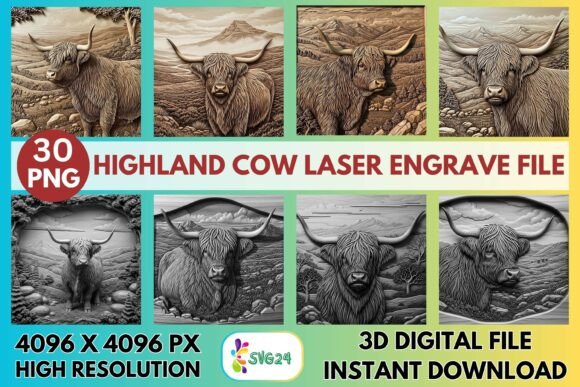
This technique allows for the simulation of depth and texture, often referred to as "3D" engraving, although it remains a two-dimensional surface treatment. The Highland cow, with its distinctive shaggy coat and rugged features, is an ideal subject for this method. The detailed textures captured in the premium grayscale PNG set enable the laser to reproduce the natural look of fur and facial contours, adding a layer of realism that simple line art cannot achieve.
Key Features and Technical Specifications
The core of this product offering lies in its resolution and format. The included files are provided at 4096×4096 pixels, a square aspect ratio that offers significant flexibility for resizing without immediate loss of quality. High resolution is critical in laser engraving because the machine interprets each pixel as a potential data point for power modulation. A low-resolution image may result in pixelation or blocky gradients, detracting from the artistic intent.
The package typically includes both coloring PNG files and grayscale PNG files, all with transparent backgrounds. The transparent background is particularly useful for makers who wish to overlay the design onto other graphics or position it precisely within a larger composition without dealing with white boxes or unwanted borders. However, it is important to note that these files are non-editable raster images. Users cannot modify the internal lines or shapes as they would with an SVG or DXF file. Resizing is the responsibility of the buyer, requiring basic image editing knowledge to maintain aspect ratios and clarity.
Material Compatibility and Application
One of the primary reasons creators select this type of file is its versatility across different substrates. The 3D Highland Cow Laser Engrave File is optimized for use on wood, leather, acrylic, paper, textiles, and coated metals. Each material reacts differently to laser energy, influencing the final aesthetic.
- Wood: Light-colored woods such as birch, maple, or basswood provide the best contrast for grayscale images. The natural grain can complement the rustic theme of the Highland cow, though it may interfere with fine details if the grain is too prominent.
- Leather: Engraving on leather produces a rich, darkened effect that enhances the vintage or farmhouse vibe. The texture of the leather adds an organic feel that pairs well with animal-themed designs.
- Acrylic and Coated Metals: While possible, grayscale engraving on these materials requires precise power settings to avoid melting or uneven marking. It is often more challenging to achieve smooth gradients compared to organic materials.
Common applications include farmhouse décor, rustic signage, kitchen accessories like cutting boards or coasters, and personalized gifts. The detailed nature of the design makes it suitable for wall art where viewers can appreciate the intricacy of the cow’s features from a close distance.
Machine Settings and Optimization
Achieving the desired outcome requires careful calibration of laser settings. The file is designed to work seamlessly with major laser platforms, but specific adjustments are necessary for optimal performance. For Glowforge users, recommended settings often involve a speed of 1000 and power of 90, using the "Grayscale – Vary Power" mode. An LPI (Lines Per Inch) of 270 is suggested to balance detail retention with processing time. Higher LPI values increase detail but also extend engraving duration significantly.
For users of LightBurn software, the choice of dithering algorithm is crucial. Jarvis dithering is frequently recommended for photographic or highly detailed grayscale images because it distributes error diffusion in a way that mimics continuous tones. This helps prevent banding artifacts that can occur with simpler dithering methods. Since the file is already optimized for laser engraving, users should avoid applying additional sharpening or contrast adjustments unless necessary for their specific material.
Evaluating Fit: When to Choose This File
This digital asset is a strong fit for makers who prioritize aesthetic depth and realistic texture in their projects. If your goal is to create high-end home décor or unique gifts that stand out through detailed imagery, the 3D Highland Cow Laser Engrave File offers a ready-made solution. It eliminates the time-consuming process of converting photographs into engrave-ready grayscale images, which requires skill in photo editing software.
Additionally, it suits beginners who may struggle with creating complex raster designs from scratch but have mastered the basics of operating their laser machine. The provided settings serve as a reliable starting point, reducing the trial-and-error phase typically associated with new designs.
Considerations and Alternatives
Despite its advantages, there are tradeoffs to consider. Because the files are non-editable PNGs, users seeking to customize specific elements of the cow’s appearance, such as changing the angle or isolating certain features, will find this format limiting. In such cases, layered SVG files or vector-based designs might be more appropriate, even if they lack the same level of tonal depth.
Furthermore, grayscale engraving is inherently slower than vector cutting or simple line engraving. The laser must pass over every inch of the design area, modulating power continuously. For large-scale production runs where speed is a priority, this may not be the most efficient choice. Users should also be aware that results vary significantly based on machine maintenance, lens cleanliness, and material consistency. What works perfectly on one piece of wood may require adjustment on another due to variations in density and moisture content.
In conclusion, the 3D Highland Cow Laser Engrave File is a specialized tool for adding rustic charm and detailed texture to laser-engraved projects. By understanding its technical requirements and material compatibility, makers can make informed decisions about whether this asset meets their creative and operational needs. It excels in applications demanding visual depth and artistic flair, provided the user is prepared to manage the nuances of grayscale laser processing.